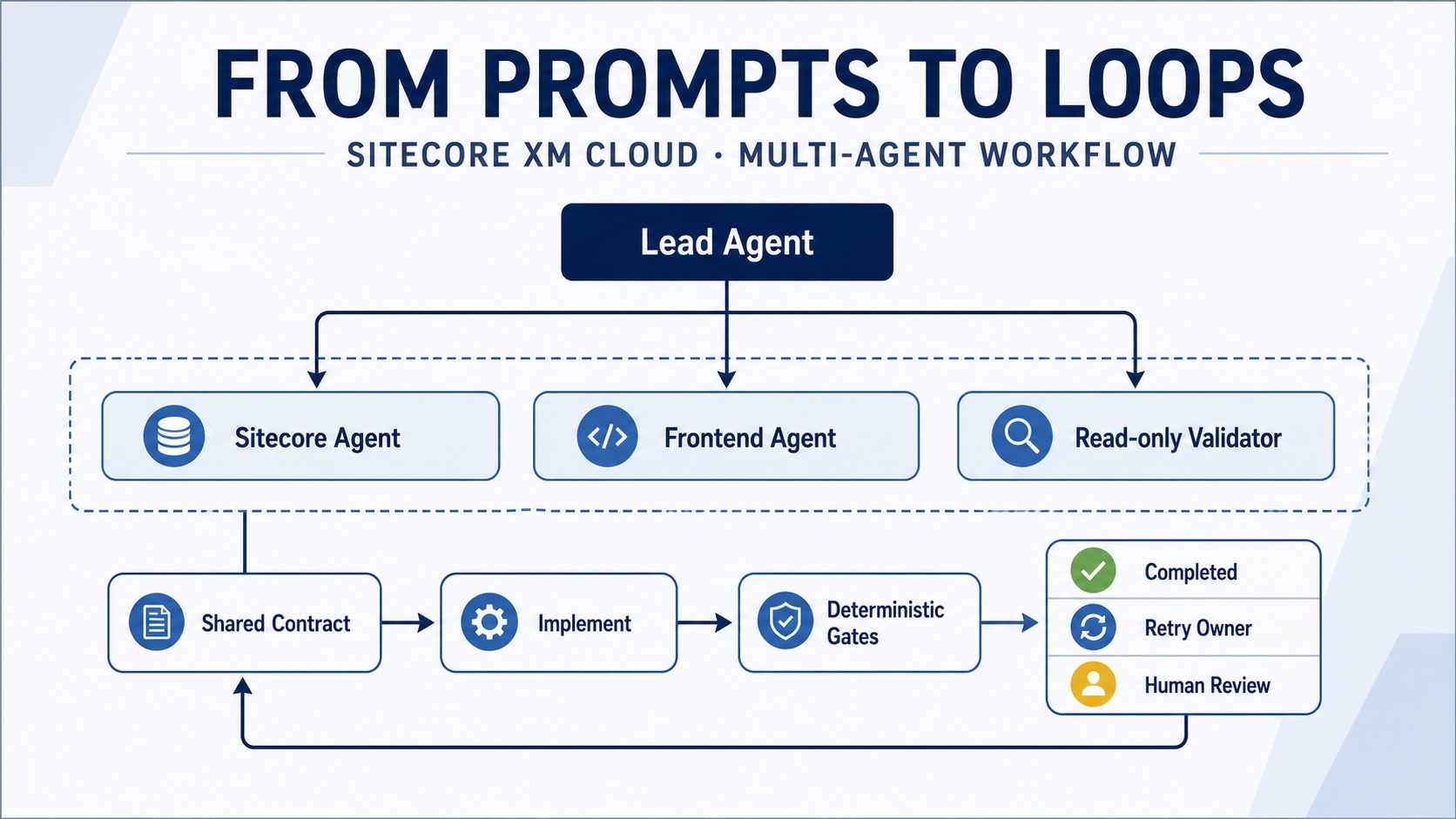
A coding prompt can start a Sitecore feature. It cannot prove that the Sitecore definition, frontend component and validation rules still agree when the work is finished.
I created an open-source Sitecore multi-agent orchestration sample to explore a simple question: how can several developer agents contribute to an XM Cloud headless feature without creating more coordination than value?
Prompt, workflow and loop
These terms are related but not interchangeable:
- Prompt: the instruction given to an agent.
- Workflow: the order in which responsibilities are performed.
- Loop: the feedback cycle that checks the result, routes a failure, applies a correction and checks again.
Prompt:   “Build a Product Highlight component.”

Workflow: Lead → Sitecore definition → frontend component → validation

Loop:     Implement → check → route failure → fix → check again
          until COMPLETED or BLOCKED
The prompt is still important. It defines the goal and constraints. The loop makes those constraints observable instead of trusting the agent to remember them throughout a long conversation.
The practical XM Cloud example
The sample feature is a simplified ProductHighlight component. Its approved contract contains five fields:
Heading
Description
ProductId
Image
CallToAction
That contract is the boundary between the Sitecore and rendering-host layers. The roles are deliberately small:
- Lead agent: owns the goal, contract, task split and final integration decision.
- Sitecore agent: owns only template and rendering definitions.
- Frontend agent: owns only the React/TypeScript field model and component.
- Validation agent: reads the combined work but does not repair its own findings.
The repository includes adapters for both Codex and Claude Code. The orchestration rules, contract and checks remain provider-neutral.
How the loop works
npm run loop:start
npm run loop:check
npm run loop:status
Starting the loop records the task, retry budget and a fingerprint of the approved contract. The check command then runs three deterministic gates:
- Contract gate: the Sitecore fields, rendering datasource and frontend model must align.
- Ownership gate: an agent must not modify files outside its role.
- Overhead gate: estimated coordination work should not exceed the benefit of parallel delivery.
Completed
All gates passed. The change is ready for human review.
Retry
A gate failed. Evidence is routed to one responsible role for a bounded correction.
Blocked
The contract changed or the retry budget was exhausted. A human decision is required.
A real failure the loop catches
Suppose the shared contract says ProductId, but the frontend agent implements ProductCode. Both names may look reasonable in isolation. The combined feature is still wrong.
Contract validation failed: frontend fields differ

LOOP_STATUS=RETRY
NEXT_OWNER=frontend
NEXT_PROMPT=prompts/frontend-agent.md
Only the frontend owner receives the correction. After the field is aligned, the gates run again. This is more useful than sending the whole team another broad “please fix it” prompt.
Why the loop does not automatically change everything
The controller does not make content-model or business decisions. It detects drift, retains evidence and routes responsibility. The developer agent still reasons about the implementation inside its permissions.
This separation is intentional:
- Checks remain reproducible even if the model changes.
- Agent reasoning can improve without weakening the architecture.
- Contract changes stay visible.
- Retries cannot continue forever.
- Human approval remains meaningful.
When multiple agents help—and when they do not
Multiple agents are useful when tasks are independent, ownership is clear and a stable contract connects the outputs. Sitecore definitions and frontend implementation can often proceed independently after the contract is approved.
One agent is usually better when:
- the feature is small;
- all work touches the same files;
- the content model is still being designed;
- the lead repeatedly rewrites specialist output;
- coordination time is greater than parallel time saved.
What to add in a real XM Cloud project
The same pattern becomes more valuable when the gates execute real project checks:
- Sitecore serialization validation
- Rendering-host compilation
- Generated GraphQL or TypeScript contract checks
- Component and integration tests
- Pages editing-mode tests
- Experience Edge schema validation
- Security, dependency and visual-regression checks where justified
Each gate should have objective pass criteria, one responsible owner, evidence safe to retain and a clear decision between retry and human review.
The architectural lesson
The objective is not to maximize the number of agents. It is to reduce coordination while preserving independent verification.
One goal
+ one shared contract
+ explicit ownership
+ deterministic gates
+ bounded retries
+ human stop conditions
A good prompt starts the task. A good loop makes the delivery process inspectable and repeatable.
Explore the working sample
The repository includes the component contract, role prompts, Codex and Claude Code instructions, ownership checks, loop controller, retry tests, coordination-overhead report and GitHub Actions validation.
View Sitecore Multi-Agent Orchestration on GitHub →